

Not a day goes by without any curiosity… so I decided to play around with some things that I didn't look at before.
This time, the main target was: Android Auto splitscreen.
As you may know, Android Auto has a splitscreen feature for wide screens:

Unfortunately, it's not possible to get this working on a MIB2 infotainment unit. Some Android devs are offering a forced split screen function, but you need to be rooted to use it. So I took a deep dive into the MIB2 High filesystem, to see what I could find to enable this splitscreen mode on my unit!
First I had a look at /eso/hmi/lsd/Resources/skin1/info.txt:

Some interesting settings here, let me go off-topic real quick ;-)
𝚄𝚜𝚎𝚛𝚂𝚠𝚒𝚝𝚌𝚑𝚊𝚋𝚕𝚎𝙼𝚎𝚗𝚞𝙼𝚘𝚍𝚎=𝚝𝚛𝚞𝚎
Enables a setting in the display settings where you can switch between the grid and flowlist menu.
And you can also see these:
𝙻𝚊𝚢𝚘𝚞𝚝.𝙰𝚗𝚍𝚛𝚘𝚒𝚍𝙰𝚞𝚝𝚘.𝙲𝚊𝚗𝚟𝚊𝚜_𝙳𝚒𝚖𝚎𝚗𝚜𝚒𝚘𝚗.𝚠𝚒𝚍𝚝𝚑=𝟾00
𝙻𝚊𝚢𝚘𝚞𝚝.𝙰𝚗𝚍𝚛𝚘𝚒𝚍𝙰𝚞𝚝𝚘.𝙲𝚊𝚗𝚟𝚊𝚜_𝙳𝚒𝚖𝚎𝚗𝚜𝚒𝚘𝚗.𝚑𝚎𝚒𝚐𝚑𝚝=𝟺𝟾0
I modified them to higher resolution. The results were not what I looked for, but not less interesting:

That was at least something!

Still not perfect, but at least the screen was still showing something, despite the native resolution being 800x480. I've read that the screens should be capable of displaying at least 1080p resolutions. Getting it to display right without all the black bars, that's a challenge for some other time!
While testing, I accidentally set a 0 too much, which resulted in an insane widescreen ratio:

I decided: this wasn't the way to go. No matter how absurdly wide screen I set it, the splitscreen mode would never show up. So I went to another file:
/etc/eso/production/gal.json
Inside this file, there's an entire section related to display properties:

The interesting part:
# 𝙳𝙿𝙸 𝚘𝚟𝚎𝚛𝚛𝚒𝚍𝚎 𝚏𝚘𝚛 𝚝𝚞𝚗𝚒𝚗𝚐 𝚄𝙸 𝚎𝚕𝚎𝚖𝚎𝚗𝚝 𝚜𝚒𝚣𝚎 (𝚍𝚙𝚒 𝚏𝚘𝚛 𝚜𝚌𝚊𝚕𝚎𝚍 𝚛𝚎𝚜𝚘𝚕𝚞𝚝𝚒𝚘𝚗𝚜 𝚊𝚛𝚎 𝚍𝚎𝚛𝚒𝚟𝚎𝚍 𝚒𝚗𝚝𝚎𝚛𝚗𝚊𝚕𝚕𝚢)
# 𝚊𝚌𝚝𝚒𝚟𝚊𝚝𝚒𝚘𝚗 𝚍𝚒𝚜𝚊𝚋𝚕𝚎𝚜 𝚊𝚞𝚝𝚘𝚖𝚊𝚝𝚒𝚌 𝚌𝚊𝚕𝚌𝚞𝚕𝚊𝚝𝚒𝚘𝚗, 𝚟𝚊𝚕𝚒𝚍𝚊𝚝𝚒𝚘𝚗 𝚊𝚗𝚍 𝚝𝚑𝚎 𝚞𝚜𝚎 𝚘𝚏 𝚋𝚞𝚌𝚔𝚎𝚝𝚜!
# 𝚜𝚎𝚝 𝚝𝚘 0 𝚝𝚘 𝚞𝚜𝚎 𝚝𝚑𝚎 𝚌𝚊𝚕𝚌𝚞𝚕𝚊𝚝𝚎𝚍 𝚟𝚊𝚕𝚞𝚎 𝚏𝚛𝚘𝚖 𝚙𝚑𝚢𝚜𝚒𝚌𝚊𝚕 𝚜𝚒𝚣𝚎 / 𝚛𝚎𝚜𝚘𝚕𝚞𝚝𝚒𝚘𝚗 𝚎𝚝𝚌.
"𝚍𝚙𝚒":0,
"𝚙𝚒𝚡𝚎𝚕𝙰𝚜𝚙𝚎𝚌𝚝𝚁𝚊𝚝𝚒𝚘𝙴𝟺":𝟷0000
The default DPI setting is "0".
A quick Google query brought me to the following topic:
www.reddit.com/r/AndroidA…onratio_for_split_screen/
A user writes that the DPI value that works for him is 103. I set the DPI to 100, and this happened:

Eureka! Split screen! But… still black bars. I decided to try some more values! The results weren't that great:

The black bars would stay. Why?!
And then I remembered. I didn't reset the info.txt resolutions to their original values!
I quickly did it, and then it was working:

It looks pretty good, and functions. There are just some things I don't like currently:
— The status bar buttons on the left are pretty small.
— There's a lot of unused screen space in the black split screen on the right. That's a waste of valuable space and I prefer the non-splitscreen version because of this.
— Some elements should be in a higher resolution than they are currently. The edges of the Navigation arrow were jagged. Probably because of the low resolution of 800x480. I should experiment with increasing this value.
— My Performance Monitor is just hideous in this view.
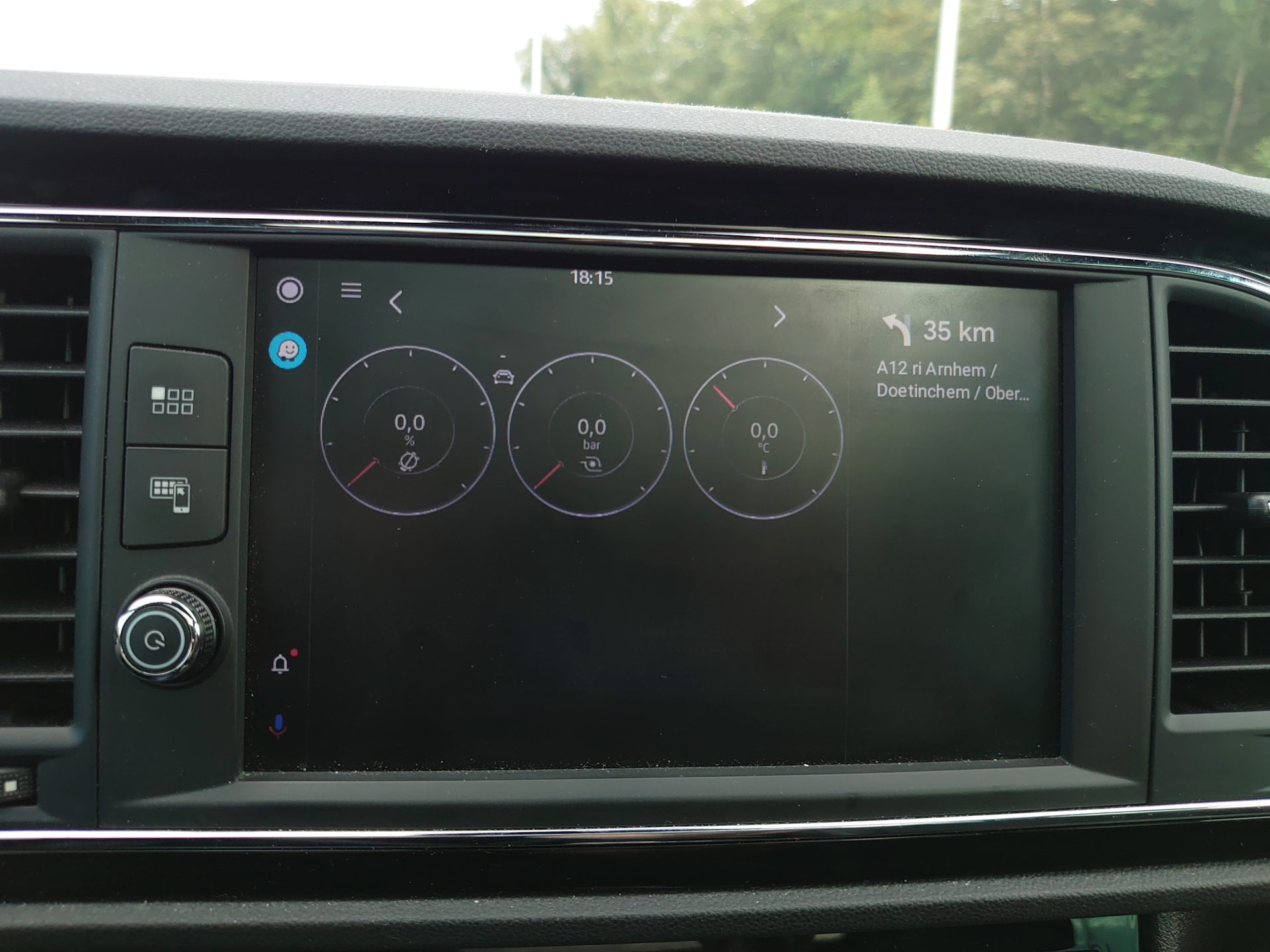
I also experimented with some other DPI's, but found out that I was happy with the value of 100.
Here's a native screenshot from within Android Auto:

Next up: increase the resolution of the AA display while retaining the fullscreen view… and add this DPI-change feature to my MIB2Toolbox!
Comments 14
Hi, unfortunately I can't find the 2 paths indicated on my MIB2 STD_Plus. Has anyone else tried to search for them to be able to change resolution or DPI on MIB2? Thanks
Hello sir, is it possible to change dpi on Mib2.5 std Delphi?
I have no experience with that, but with AA Wireless you can force a dpi change
Aawireless and carlinkit 4.0 could, I have first one. But I want to connect simply with cable, without interface.
daChillout
I have no experience with that, but with AA Wireless you can force a dpi change
Hi.
What about "dpi change" feature via MIB2Toolbox? Should we hope about this feature be added? Thanks for your reply.
Great results!
But how can I access file system on my information system module? Probably, stupid question :)
Your knowledge is spreading!
"Genius Hack Enables Android Auto Split-Screen in Unsupported Cars — autoevolution" www.autoevolution.com/new…upported-cars-166270.html
😲 whoa
Simply amazing! Your posts makes me wanna buy an MQB
Awesome! You're great! 👍👍👍
Awesome
Wow. This is wonderful. but does it have any practical application in life on a small screen?
Not too much. It's nice to see a slightly bigger navigation instruction while you're using an other app, and seeing the song title while navigating is nice too. but I think that's about it.
I agree with you. Similar to Columbus mib2.5 functionality.